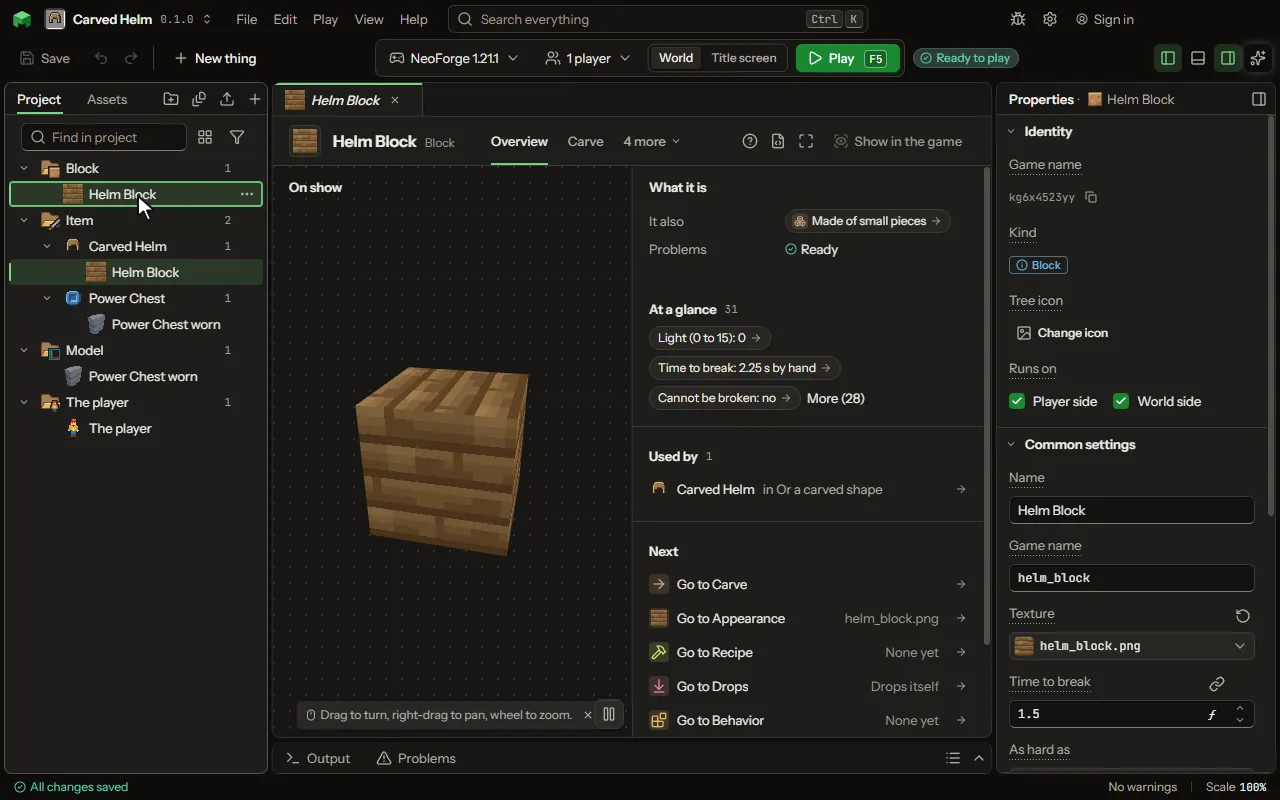
Block editor
Something placed in the world: ore, stone, a crate.
How to add it#
- New thing > Blocks and items > Block
- New thing > Machines and networks > Machine
- New thing > Machines and networks > Generator
- New thing > Machines and networks > Cable
- New thing > Machines and networks > Pipe
- New thing > Machines and networks > Item pipe
- New thing > Machines and networks > Tank
- New thing > Machines and networks > Transmitter
- New thing > Machines and networks > Receiver
- New thing > Machines and networks > Wireless energy node
- New thing > Machines and networks > Shared chest
- New thing > Machines and networks > Shared tank
- New thing > Machines and networks > Chest
- New thing > Machines and networks > Drawer
- New thing > Machines and networks > Storage crate
- New thing > Machines and networks > Mailbox
- New thing > Machines and networks > Trade station
- New thing > Machines and networks > Asking chest
- New thing > Machines and networks > Terminal
- New thing > Machines and networks > Storage cell
- New thing > Machines and networks > Storage cable
- New thing > Machines and networks > Drive
- New thing > Machines and networks > Network heart
- New thing > Machines and networks > Dense cable
- New thing > Machines and networks > Link
- New thing > Machines and networks > Access point
- New thing > Machines and networks > Crafter
- New thing > Machines and networks > Pattern table
- New thing > Machines and networks > Matter tank
- New thing > Machines and networks > Altar
- New thing > Machines and networks > Pedestal
- New thing > Machines and networks > Formed machine
- New thing > Machines and networks > Machine casing
- New thing > The world > Waypoint
- New thing > Machines and networks > Aiming block
- New thing > The world > Berry bush
- New thing > Machines and networks > Matter pipe
- New thing > Blocks and items > Assembly station
- New thing > Blocks and items > Carved block
- New thing > Blocks and items > Ore
- New thing > Blocks and items > Crop
- New thing > Blocks and items > Plant
What you can set#
| Setting | What it does |
|---|---|
| Name | What players read in the game, in any words: spaces and capitals are fine, like "Ruby Blade of Sam". The Game name is the short name the game uses instead. You can change it any time. |
| Game name | The short name the game and its commands use: small letters, digits and underscores, like katana. In commands and recipes the mod's short name and a colon go in front: for a mod called rubygear, katana is written rubygear, a colon, then katana. Players never read it; that is the Name. Change it later and it is renamed everywhere. |
| Texture | The picture on every face of the block. |
| Shape | A shape of your own for this block to wear instead of a plain cube. Leave it empty and the block stays a cube. |
| Light (0 to 15) | How much light the block gives off, from 0 to 15. A torch is 14. From 0 to 15. |
| Time to break | How hard the block is; stone is 1.5, dirt 0.5. Higher is slower; obsidian is 50. The overview shows the seconds by hand. From 0 to 3600. |
| Tooltip lines | Extra lines under its Name when a player points at it, such as "Tastes like thunder.". The Name itself is set above. Each row has: Words, Color. |
| Plays as frames | Which of the block's pictures play as a strip of frames, and how fast. It is set on the picture itself. |
| Blocks across | How many blocks wide its front is, from 1 to 5. From 1 to 5. |
| Blocks up | How many blocks tall it is, from 1 to 5. From 1 to 5. |
| Blocks back | How many blocks deep it is, away from whoever places it, from 1 to 5. From 1 to 5. |
| Sounds like | The game's own sounds of a sort of block, for breaking it, walking on it and placing it. Choose one of: Stone, Wood, Gravel, Grass, Metal, Glass, Wool, Sand, Snow, Amethyst, Copper, Deepslate, Netherite, Bone, Honey, Slime, Mud, Bamboo, Cherry wood, Chain, Lantern. |
| Breaking sound | A sound, the game's or your own, played when it is broken, in place of its sort's. |
| Step sound | A sound, the game's or your own, played when something walks on it, in place of its sort's. |
| Placing sound | A sound, the game's or your own, played when it is placed, in place of its sort's. |
| Gives off | A particle, the game's or your own, it gives off now and then from its top, as a torch gives off smoke. |
| Made from the game's | The game's own thing this one behaves like; its behaviour stays the game's. A block kind from the game, such as grass or ice, written with its game name. Empty: a plain block. |
| Form | The game's own shapes, each drawn from this block's picture and working as the game's own does: stairs you walk up, a slab that doubles, a fence and a wall that join their neighbours, a door and a trapdoor that open, a button and a pressure plate that give a redstone signal, a pane, a carpet, leaves that fall away when no log is near, a pillar that lies the way it is placed, and a rail the game's carts ride. Choose one of: A full block, Stairs, A slab, A wall, A fence, A fence gate, A door, A trapdoor, A pressure plate, A button, A pane, as glass and bars, A carpet, Leaves, A pillar, as a log, A rail, A slope, A slope, outer corner, A slope, inner corner, A ridge, as a roof top, A quarter round, as an arch, A round pillar, A window frame. |
| Wears the block used on it | Off, the shape shows this block's own picture. On, a player can use any full block on it, from this mod, the game or another mod, and the shape then shows that block's pictures instead, grass and leaves colours included. Using nothing while sneaking gives the block back, and breaking the shape gives it back too. The slope, corners, ridge, quarter round, round pillar and window frame turn to face you and hang upside down when placed on a ceiling or on the top half of a side, like stairs. |
| Turns carts | Whether a cart rolling onto it goes off to one side instead of straight on: never, while redstone powers it, or by the cart, when the cart matches the list below. Lay track on three sides of it, like a T. Choose one of: Never, While powered, By the cart. |
| Turns to | The side a turned cart goes off to, as the cart sees it coming in: its left or its right. Choose one of: Left, Right. |
| Which carts turn | The carts that turn, any one of these: a kind of cart (a chest minecart), an item it carries (coal), a tag of items (all ores), or the fluid in its tank (water), each by its game name. Empty: every cart turns. |
| Gives a signal | A redstone signal while a cart is on it: for any cart, only a full cart, only an empty cart, or stronger the fuller the cart is. Full counts its chest, its tank and its battery together. Choose one of: Never, For any cart, For a full cart, For an empty cart, By how full. |
| Which carts count | Only these carts give the signal, any one of them: a kind of cart, an item or a tag it carries, or the fluid in its tank. Empty: every cart. |
| Picture of its ends | The picture on its two ends, as a log shows its rings; its sides wear the block's own picture. With none, the ends wear that too. |
| Picture of the top half | The door's upper half; its lower half and the item in the hand wear the block's own picture. With none, both halves wear that. |
| Works like | Wood: a door or trapdoor opens by hand, a button stays pressed longer and an arrow presses it, a pressure plate feels anything on it, a fence joins the game's wooden fences. Metal or stone: only redstone opens a door or trapdoor, and only a player or a mob presses a plate. Choose one of: Wood, Metal or stone. |
| Turns | Whether it turns to face whoever places it, as a furnace does, or any way at all, up and down too, as a dispenser does. A picture for its front shows which way it faces. Choose one of: Never, To face whoever places it, Any way, up and down too. |
| Picture of its front | The face that looks at whoever placed it, as a furnace's front; every other face wears the block's own picture. |
| See through | Solid hides what is behind it. Holes shows through the see-through pixels of its picture, as leaves and bars do. Tinted glass mixes what is behind with the colour of each half-see-through pixel, as stained glass does. Choose one of: Solid, Holes, Tinted glass. |
| Holds water | Water can stand in it, as in a slab or a lantern: placed in water it keeps the water, and a bucket fills it. |
| Box from, across | The box it takes, in sixteenths of a block, from 0 to 16 on each side: what a player bumps into, what the cursor outlines and, with its own picture, what is drawn. 0 0 0 to 16 16 16 is a whole block; 0 0 0 to 16 8 16 is its lower half. A block that turns turns its box too. From 0 to 16 pixels. |
| Box from, up | The box it takes, in sixteenths of a block, from 0 to 16 on each side: what a player bumps into, what the cursor outlines and, with its own picture, what is drawn. 0 0 0 to 16 16 16 is a whole block; 0 0 0 to 16 8 16 is its lower half. A block that turns turns its box too. From 0 to 16 pixels. |
| Box from, back | The box it takes, in sixteenths of a block, from 0 to 16 on each side: what a player bumps into, what the cursor outlines and, with its own picture, what is drawn. 0 0 0 to 16 16 16 is a whole block; 0 0 0 to 16 8 16 is its lower half. A block that turns turns its box too. From 0 to 16 pixels. |
| Box to, across | The box it takes, in sixteenths of a block, from 0 to 16 on each side: what a player bumps into, what the cursor outlines and, with its own picture, what is drawn. 0 0 0 to 16 16 16 is a whole block; 0 0 0 to 16 8 16 is its lower half. A block that turns turns its box too. From 0 to 16 pixels. |
| Box to, up | The box it takes, in sixteenths of a block, from 0 to 16 on each side: what a player bumps into, what the cursor outlines and, with its own picture, what is drawn. 0 0 0 to 16 16 16 is a whole block; 0 0 0 to 16 8 16 is its lower half. A block that turns turns its box too. From 0 to 16 pixels. |
| Box to, back | The box it takes, in sixteenths of a block, from 0 to 16 on each side: what a player bumps into, what the cursor outlines and, with its own picture, what is drawn. 0 0 0 to 16 16 16 is a whole block; 0 0 0 to 16 8 16 is its lower half. A block that turns turns its box too. From 0 to 16 pixels. |
| States of its own | What the block can be besides itself, as a lamp is lit or not and a crop is at a stage: each a switch that is on or off, or a number from 0 up to its most. Placed, each is off or 0; a rule turns it with Turn the ... of the block, and finds it with Find the ... of the block, by its name. Each row has: Name, Holds, Up to. |
| Looks by state | How it looks and how much light it gives while a state is set so: the first that fits wins, and with none it looks as itself. Each row has: While, Is, Picture, Light. |
| Its own numbers | Numbers each placed block keeps, such as its heat. Rules set them; moving parts follow them. Each row has: Name, Most. |
| Animations | The animations it plays, chosen by what it is doing. |
| Selection outline | One frame (default): a single box round everything the block draws, as machines in other mods are outlined, never a box for each part. Detailed shape: each part of the model, the moving ones as the box they sweep. None: no outline. A block whose model draws nothing has no outline unless set otherwise. Choose one of: One frame round everything it draws, Detailed shape (each part), None. |
| Shape (hit and bump) | What the cursor outlines and what a player bumps into. From the model uses the boxes of the block's model (or the game's shape). Full block makes it the whole block. Your own boxes lets you list boxes, in sixteenths of a block. Choose one of: From the model, Full block, My own boxes. |
| Boxes | Each box goes from one corner to the other, in sixteenths of a block (0 to 16). The shape is all the boxes together. Each row has: From, across, From, up, From, back, To, across, To, up, To, back. |
| No collision | Players, mobs and arrows pass through it, but the cursor can still point at its shape. |
| Walk through it | Nothing bumps into it: players, mobs and arrows pass through, as through tall grass or a cobweb. |
| Falls | With nothing under it, it falls, as sand and gravel do, and lands on whatever stops it. |
| Stands up to explosions | Higher holds out better. Stone is 6, obsidian is 1200; a creeper's explosion breaks what is under about 4 near it. From 0 to 3600000. |
| Best broken with | The tool that breaks it fast, as a pickaxe breaks stone. Any tool: every tool breaks it at the speed of a hand. Choose one of: Any tool, A pickaxe, An axe, A shovel, A hoe. |
| At least | How good that tool has to be, as iron ore needs a stone pickaxe and diamond ore an iron one. Choose one of: Any, Stone, Iron, Diamond. |
| Drops only with that tool | Broken with anything else it gives nothing, as stone gives nothing to a hand. |
| Slippery | How much it keeps things sliding: 0.6 is most blocks, 0.8 slime, 0.98 ice, 0.989 blue ice. From 0.1 to 1.1. |
| Walking speed on it | 1 is normal; soul sand is 0.4, honey 0.4; above 1 it hurries whoever walks on it. From 0.1 to 3 times. |
| Jump on it | 1 is normal; honey is 0.5; above 1 it sends whoever jumps from it higher. From 0.1 to 3 times. |
| When a piston pushes it | What a piston does to it: moves it as stone, breaks it as a torch or pumpkin, cannot move it as obsidian, or pushes it but never pulls it back as glazed terracotta. Choose one of: It moves, It breaks and drops, It stays put, Pushed, never pulled. |
| Catches fire | How readily fire nearby sets it alight, from 0 (never) to 300: planks are 5, wool and leaves 30, hay 60. From 0 to 300. |
| Burns away | How fast it burns away once alight, from 0 (never) to 300: planks are 20, wool and leaves 60, hay 20. From 0 to 300. |
| Lava sets it alight | Lava beside it can start a fire on it, as on wood. |
| Gives way to a placed block | A block placed where it stands takes its place, as over tall grass or snow. |
| A dispenser places it | A dispenser facing an empty space puts this block down there, as it does with a shulker box. Off, the dispenser shoots it out as an item. |
| Keeps contents when broken | Broken, it drops as one item that still holds everything that was inside, with its settings. Put it down again and it is just as it was. |
| A wrench turns it | Use a wrench on it and it turns to the next way round. Any item in the wrench tag is a wrench, from this mod or another. |
| Wrench picks it up | Sneak and use a wrench on it and it comes off as an item that keeps everything inside it. No loot roll. |
| Wrench tag | The item tag that counts as a wrench for this block. Leave it as it is to work with the wrenches of other mods. |
| Muffles vibrations | A sculk sensor does not hear what happens on it and no vibration passes through it, as with wool. |
| Cannot be broken | Nothing breaks it, not by hand and not with a blast, as with bedrock. How hard it is no longer matters. |
| Glows in the dark | Its picture stays bright even in a dark cave. This only changes how it looks, it gives off no light. |
| Name colour | The colour of its name when you hold it: common is white, rare is blue, epic is purple. Choose one of: Common, Uncommon, Rare, Epic. |
| Chooses light blocked | Off, the game decides: a full block stops all light, glass stops none. On, you choose the number. |
| Light it blocks | From 0 (all light passes) to 15 (none passes). Light loses this much going through the block. From 0 to 15. |
| Experience dropped (least) | The fewest experience points it drops when it is mined. Leave both at 0 for none. From 0 to 1000. |
| Experience dropped (most) | The most experience points it drops when it is mined. It picks a number between the least and this. A tool with Silk Touch gets none. From 0 to 1000. |
| Pick-block item | What you get when you point at it and press the pick-block key (middle click). Leave it empty to get the block itself. |
| Runs every tick | A piece of your own code that the game runs twenty times a second for every one of these blocks placed in a world, for what the settings here cannot say: dig a block every few ticks, form a pattern, keep a count. Leave it empty and the block runs nothing. |
| Drawn every frame by | A piece of your own code that draws on this block every frame it is seen, after the moving parts of its shape, for anything the shape cannot say. Leave it empty and the shape is all that is drawn. |
| Joins look with neighbours | With edges, a face hides its border next to a block that joins it, so a wall of glass or framed stone reads as one big pane. You give one picture; the game does the rest. Choose one of: Off, Hide edges. |
| Border width | How many pixels of the picture's edge are the border that gets hidden, from 1 to 4. From 1 to 4 pixels. |
| Joins with | Other blocks it joins its look with, besides blocks like itself. A block of the game, one of yours, or a #tag. Each row has: Block. |
| Random looks | More pictures for the same block. Each placed block picks one by where it stands, so a floor of it does not repeat. A bigger weight is picked more often. Each row has: Picture, Weight. |
| Turns randomly | Each placed block is also turned a quarter, half or three quarters round by where it stands. Not used when the block joins its look with neighbours. |
What it becomes in the game#
It is added to the game, so a player needs your mod to see it.
What it works with#
It points at: Model, Sound, Particle, Item, Code.
These point at it: Recipe, Drop, Behavior, Machine recipe, Station recipe, Ritual, Vehicle, Villager job, Feature, Caves, Biome, Structure, Dimension, Creative tab, Game thing changed, Gene, Species.
A recipe#
A block with your own picture shows how to draw or import the picture for the Texture setting.
Picture#
Related pages#
- Block
- Machine
- Generator
- Cable
- Pipe
- Item pipe
- Tank
- Transmitter
- Receiver
- Wireless energy node
- Shared chest
- Shared tank
- Chest
- Drawer
- Storage crate
- Mailbox
- Trade station
- Asking chest
- Terminal
- Storage cell
- Storage cable
- Drive
- Network heart
- Dense cable
- Link
- Access point
- Crafter
- Pattern table
- Matter tank
- Altar
- Pedestal
- Formed machine
- Machine casing
- Waypoint
- Aiming block
- Berry bush
- Matter pipe
- Assembly station
- Carved block
- Ore
- Crop
- Plant
- Glossary